
Excel & Google Sheets Alternative for Small K-12 Schools
Most microschools, Montessori programs, and new private schools start on Excel or Google Sheets because spreadsheets are free and flexible. Once you pass 20–30 students or 2–3 teachers, broken formulas, duplicate student lists, manual report cards, and copy-pasted parent emails eat hours every week. Lekktura replaces that patchwork in one afternoon — starting at $49/mo with a 30-day free pilot.
- Import your existing spreadsheet via CSV
- Batch report cards & no-login parent links
- Role-based access — no accidental overwrites
No credit card required · Set up in days, not months
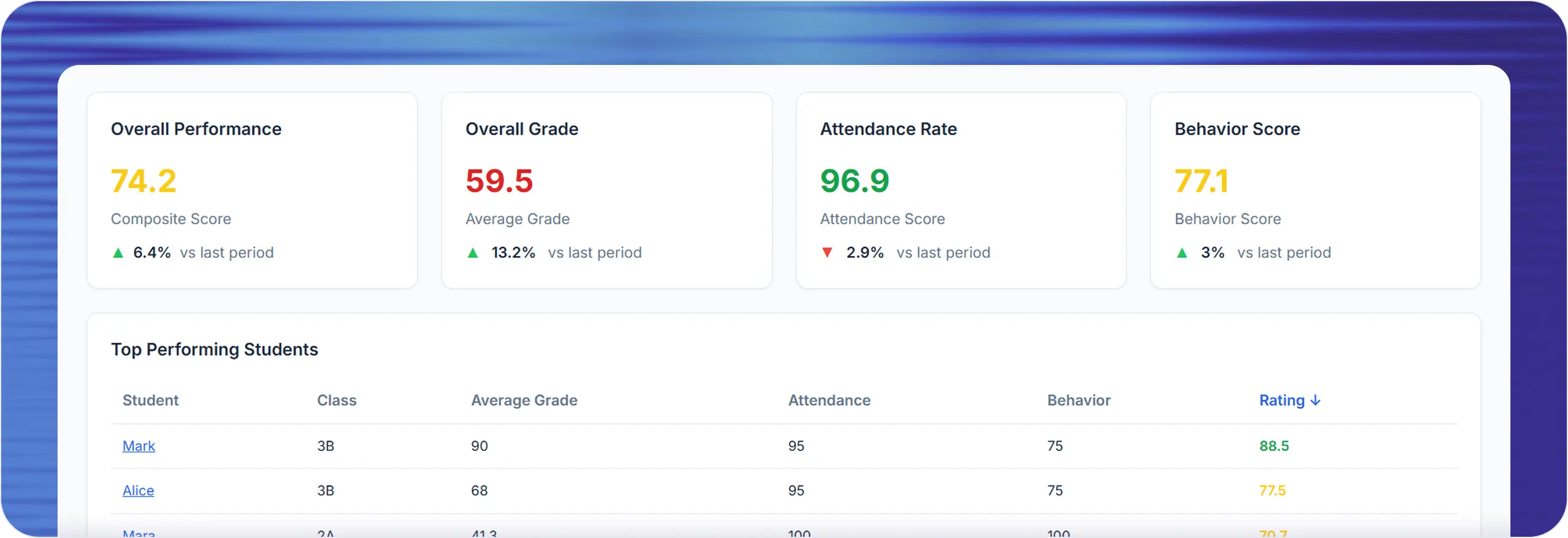
What Is Better in Lekktura vs What Is Better in Excel / Google Sheets
Spreadsheets are unbeatable for ad-hoc math and custom budgets — which is why almost every small school starts with them. Here is where spreadsheets stop scaling and where a purpose-built school workspace takes over:
Where Lekktura Is Better
Built for daily school opsBest for schools with 2+ teachers or 20+ students that want connected records, batch report cards, and zero manual email copying.
- One connected student record: Grades, per-lesson attendance, and behavior observations live on one student profile instead of 10 separate tabs.
- Batch report cards in minutes, not weekends: Automatically calculates term averages and letter grades across quarters, semesters, or trimesters — print all or email all parents in one batch.
- No-login parent portal & two-way chat: Parents open a private link for their own child only — zero risk of accidentally sharing another student's row.
- Role-based teacher permissions: Teachers edit only their assigned classes and subjects; principals see school-wide analytics without chasing file exports.
- Encrypted storage & automated backups: No broken formulas, no accidental column deletes, and no student grades sitting in personal Drive folders.
Where Excel / Google Sheets Is Better
Free & infinitely customBest for solo tutors with a handful of students or custom administrative spreadsheets like budgets and supply inventories.
- $0 software cost: Google Sheets is free and Excel is already installed on most school computers.
- Unlimited custom formulas & layouts: Build any one-off calculation, financial budget, or custom narrative grid with total freedom.
- Zero new tool to introduce for 1 person: If one teacher manages 8–10 students alone and rarely sends formal report cards, a sheet may be enough.
- Offline editing (Excel): Works on a local laptop without an internet connection.
Feature-by-Feature Comparison: Lekktura vs Spreadsheets
Compare what happens on a normal school week in spreadsheets versus Lekktura:
| Daily School Task | Lekktura for Schools | Excel / Google Sheets |
|---|---|---|
| Taking attendance & logging behavior | One-click per-lesson attendance + positive/negative behavior log tied to student profile | Manual columns or separate tabs; easy to break dates or misalign rows |
| End-of-term report cards | Automatic averages, custom letter scales, teacher notes, batch print & email | Manual mail-merge templates, copy-pasting grades into Word/Docs, hours of formatting |
| Updating parents | Private no-login link per child + built-in two-way parent-teacher chat | Manually typing individual emails or exporting PDFs one student at a time |
| Principal school-wide view | Live dashboard across all classes, subjects, attendance, and behavior | Collecting and merging separate teacher spreadsheets by hand every month |
| Student data privacy & access control | Role-based access (teachers see only their classes), encrypted storage, automated backups | Shared Drive links, accidental row leaks, or outdated local copies on laptops |
| Time spent by staff each week | Minutes — enter once, reuse everywhere | Hours of formatting, fixing formulas, and answering "how is my child doing?" emails |
Cost Comparison: "Free" Spreadsheets vs Flat School Pricing
Spreadsheets have a $0 sticker price, but staff time spent formatting report cards, reconciling attendance sheets, and emailing parents adds up fast. Lekktura starts at $456/year ($38/mo annual) — less than 2 hours of admin time per month:
| School Size | Lekktura (Published) | Excel / Google Sheets |
|---|---|---|
| Microschool / Pod (up to 40 students) | $49/mo ($456/yr annual) · $0 setup | $0 software + ~10–20 hrs/month in manual report cards, merging & parent emails |
| Small Private School (up to 100 students) | $99/mo ($996/yr annual) · $0 setup | $0 software + high error risk across 5–10 separate teacher files |
| Growing K-12 School (up to 300 students) | $229/mo ($2,292/yr annual) · $0 setup | Practically unmanageable without a dedicated person consolidating sheets |
When to Stay on Spreadsheets vs Switch to Lekktura
Be honest about where your school is today:
Stay on Spreadsheets
You are a solo educator with fewer than 10–15 students, no other teachers to coordinate, and no need for formal report cards or a shared parent portal.
Move to Lekktura
You have 2+ teachers or 20+ students, spend weekends building report cards by hand, or want principals and parents to see live progress without chasing spreadsheets.
Import Your Sheet in 10 Minutes
Export your existing Google Sheet or Excel roster as CSV, upload it into Lekktura's 30-day free pilot, and keep your original sheet as backup while you test.
Signs Your School Has Outgrown Spreadsheets
If you answer "yes" to two or more of these, spreadsheets are already costing your team more than software:
-
1
Teachers maintain separate grade and attendance files in different formats.
-
2
End-of-quarter report cards require manual copy-pasting or mail-merge scripts.
-
3
The principal has to email teachers to find out which students are falling behind or missing class.
-
4
Someone has accidentally broken a formula, sorted one column without the rest, or deleted rows.
-
5
Teachers copy grades into individual parent emails every time a family asks for an update.
-
6
Student records live across personal Google Drives or laptops with no role-based permissions.
Frequently Asked Questions
Short answers to what schools ask most.
Can we import our existing Excel or Google Sheets student list into Lekktura?
Yes. Save your spreadsheet as a CSV file and upload it directly into your classes in Lekktura. You do not need to retype students one by one.
Will non-technical teachers be able to switch from spreadsheets easily?
Yes. Lekktura was built specifically for lean schools without IT teams — entering grades and marking attendance feels as direct as a table, without any formulas to break or tabs to link.
How does Lekktura save time on report cards compared to Excel?
Instead of exporting averages and mail-merging into Word or Google Docs, Lekktura calculates term averages and letter grades automatically and lets you print all report cards or email them to parents in one batch.
Is there a free trial to test replacing our spreadsheets?
Yes. Every school gets a 30-day free pilot with no credit card required. Import one real class and run it alongside your spreadsheet for a week to see the difference.
Keep exploring Lekktura
Helpful next steps for school leaders and administrators.
Compare Lekktura school plans and pricing
Start with Micro ($49/mo) for up to 40 students and 4 teachers.
Read moreHow to Choose a School Management System for K-12
A practical checklist for principals moving off spreadsheets.
Read moreNeed help importing your spreadsheet?
Write to us and we will help you get your roster loaded cleanly.
Read moreMore for schools
Other parts of the platform your school will use every day.
Other comparisons
By type of school
By capability
FOR SCHOOL TEAMS
Run Your School's Daily Academic Workflow in One Place
Create your school, invite teachers by email, and start recording real grades and attendance during the pilot. No installation, no IT project.