
Microschool Management Software for Small Learning Communities
Lekktura is school software sized for a microschool: one workspace for attendance, grades, observation notes, student records and parent updates, run by one or two adults without an office, a server or an IT budget. Plans start at $49/month and every school begins with a free 30-day pilot.
- Sized for 5 to 50 students
- One workspace, no IT setup
- Micro plan from $49/month
No credit card required · Set up in days, not months
School Software That Is Actually Sized for a Microschool
Most school management platforms are priced and structured for hundreds of students and a dedicated administrator. A microschool with fifteen students and two guides ends up choosing between an enterprise system it will never grow into and a folder of spreadsheets that falls apart by the second term.
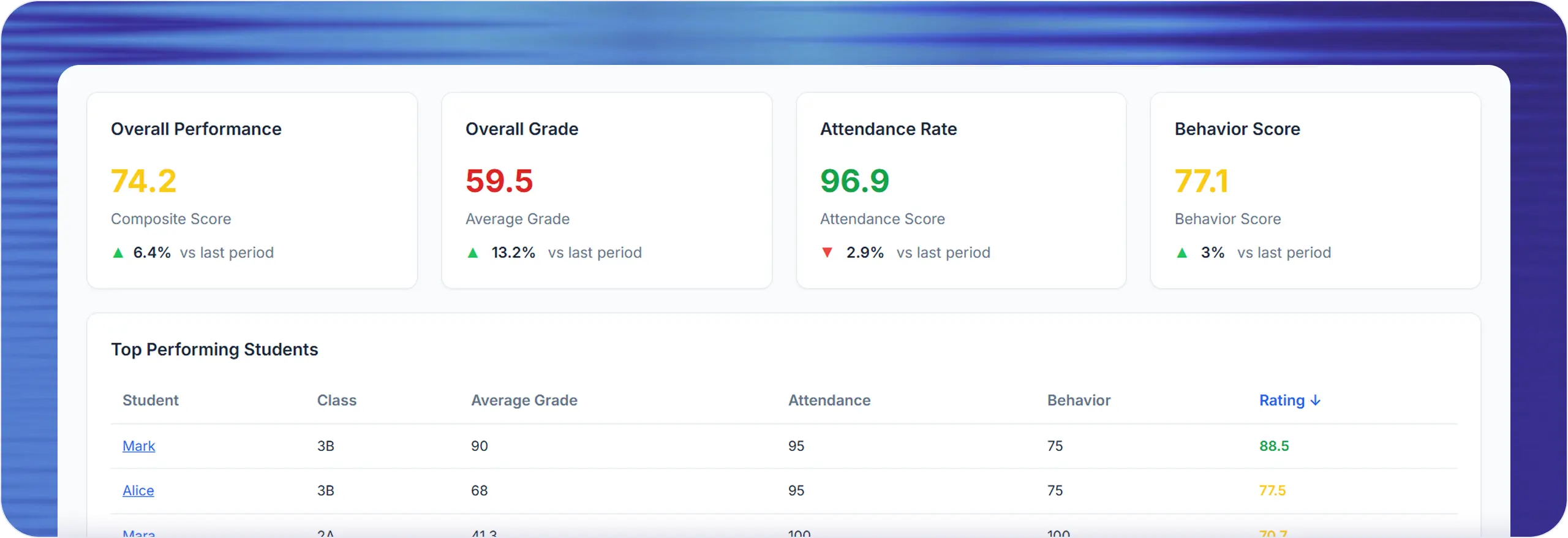
Lekktura sits in between. It is a real shared school workspace — classes, students, attendance, grades, behavior notes, parent reports and a whole-school view — with setup measured in an afternoon rather than a semester.
Microschools and learning pods
Hybrid and university-model programs
Homeschool co-ops running shared classes
New schools in their first or second year
What a Microschool Runs on Lekktura
The point of a microschool is that one adult knows every child well. The point of the software is to make sure that knowledge is written down, shared with the other adults, and easy to show a family.
Attendance by date and session, with five statuses
Grades with a written comment on each entry, or no grades at all
Positive and negative observation notes on any student
Student records with custom tags for individual needs
Assignments with due dates when a program uses them
Private parent progress reports sent by secure link
A whole-school view even when the school is one room
Built for One or Two Adults, Not an Office Team
In a microschool the person teaching is also the person answering parents, planning the week and keeping the records. Anything that takes twenty minutes a day will be abandoned.
Attendance, grades and behavior for a class are recorded in the same pass rather than in three separate systems, with bulk marking for the common case where everyone is present. Mistakes can be corrected later without an administrator.
No installation, no server, no IT support needed
Works on a phone between activities
Import your student list from a spreadsheet instead of retyping it
Invite a second guide by email and give them their classes
Parent Updates Are the Product for a Microschool
Families paying for a small program want to see that it is working. That reassurance is usually delivered as a long personal message every few weeks, written by the same person who taught all day.
Lekktura turns it into a read-only progress report sent through a private link for that child, covering the recent period with attendance, observations and any grades recorded. No parent account, no app, and each family sees only their own child.
Send to one family, or to every family at once
The school chooses when — nothing goes out automatically
Consistent updates instead of a message written from memory
A Record That Survives Growth and Staff Changes
Microschools change shape quickly. A second guide joins, a group splits into two classes, the program adds a year. Records kept in one person's notebook or personal spreadsheet do not survive that.
| Before | With Lekktura |
|---|---|
| Attendance in a notebook | Attendance recorded per session and per date |
| Progress in one adult's head | A dated, shared student history |
| Long personal update emails | Private progress reports by secure link |
| Records lost when staff change | Records that stay with the school |
| Spreadsheets per class | One workspace as the program grows |
Microschool Pricing Without Per-Teacher Costs
Plans are billed at the school level rather than per teacher, which is what makes this workable for a program with two staff and part-time help. Everyone in the workspace gets the same tools.
The Micro plan starts at $49/month and is sized for small programs. If the school grows past it, larger plans cover more students, teachers and classes. Every school starts with a free 30-day pilot, with no credit card required.
What Lekktura Does Not Do
Lekktura is not a full student information system. It does not handle enrollment, tuition billing, or state compliance reporting, and it is not a curriculum or a learning management system.
It covers the daily academic record and family communication. Microschools typically pair it with whatever they already use to collect payments and manage their curriculum.
Keep your existing payment and curriculum tools
Use Lekktura for attendance, grades, observations and parent reports
What to Ask When Comparing Microschool Software
Small programs get sold enterprise systems. These questions surface the mismatch early:
-
1
Is the price per school, or does it scale per teacher?
-
2
Is there a minimum number of students to sign up?
-
3
Can one person set it up without technical help?
-
4
Can attendance, grades and notes be recorded in a single pass?
-
5
Can parents read an update without creating an account?
-
6
Do the records stay with the school if a guide leaves?
Questions before you start
Short answers to what schools ask most.
What is microschool management software?
It is a shared workspace a small learning community uses to record attendance, grades, observations and student records, and to send progress updates to families. Lekktura covers that daily record without the setup a large school system requires.
Is there a minimum school size?
No. The Micro plan is sized for small programs and works for a school of a handful of students with one or two adults. Larger plans exist for schools that grow past it, and the records move with you.
How much does it cost for a microschool?
Plans start at $49/month for the Micro plan and are billed per school rather than per teacher. Every school can run a free 30-day pilot with real students and real data before choosing a plan, with no credit card required.
Do we need grades to use it?
No. Attendance, observation notes, student records and parent progress reports all work without a single grade entered. Programs that do record grades can attach a written comment to each one.
Can a learning pod or homeschool co-op use it?
Yes. Any program with shared classes and more than one adult benefits from a shared record. Classes, students, attendance and notes work the same way whether the group meets five days a week or two.
Do parents need an account?
No. Families receive a private link to a read-only progress report for their own child. There is no account to create and no app to install, and each family sees only their own student.
How long does setup take?
Usually an afternoon. You create the school, add a class, import your student list from a spreadsheet, invite a second guide by email if you have one, and start recording the same day.
Keep exploring Lekktura
Helpful next steps for private school leaders and administrators.
More for schools
Other parts of the platform your school will use every day.
By type of school
By capability
Run Your School's Daily Academic Workflow in One Place
Create your school, invite teachers by email, and start recording real grades and attendance during the pilot. No installation, no IT project.
30-day free pilot · No credit card required