
Montessori School Management Software for Multi-Age Classrooms
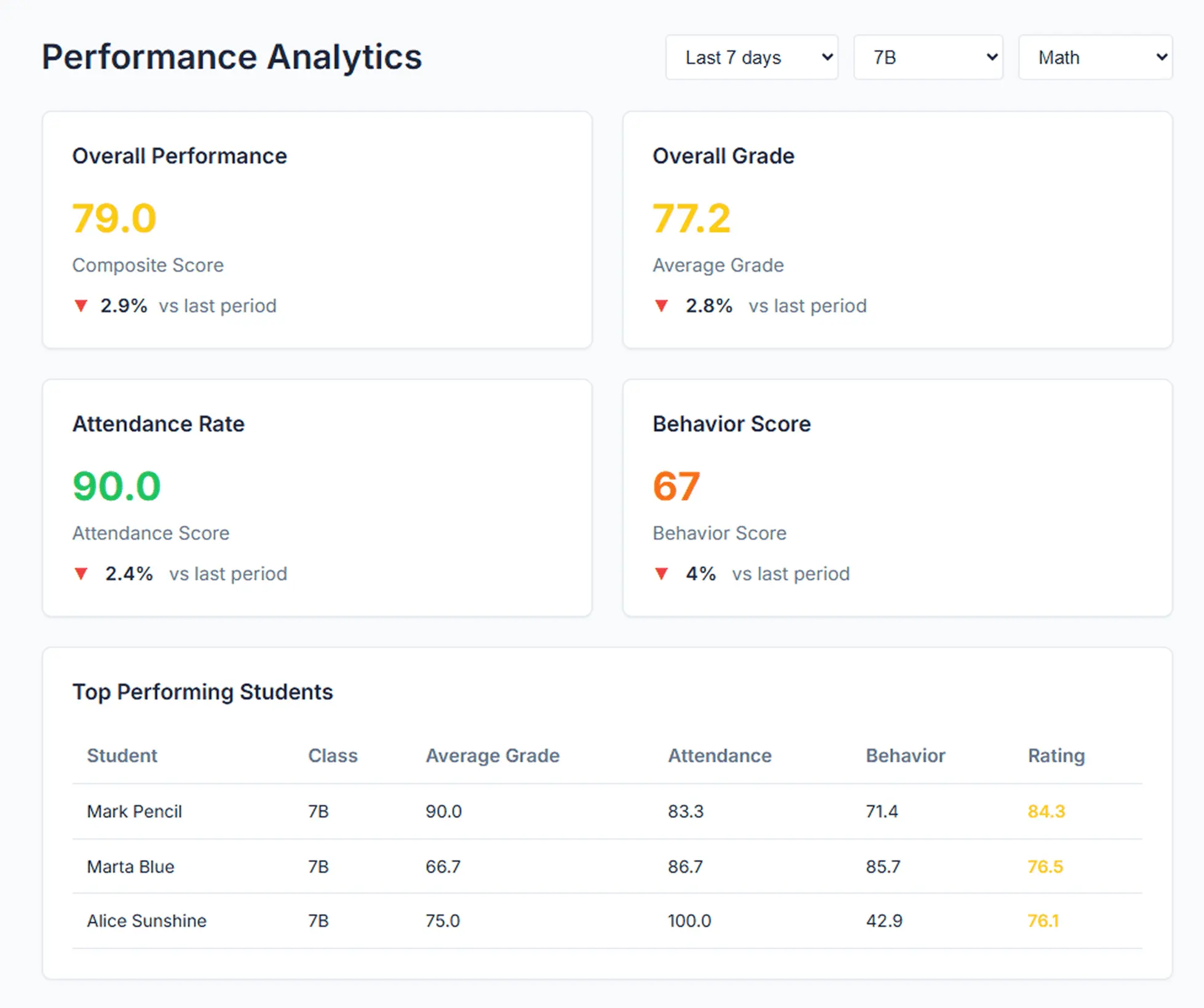
Lekktura gives Montessori schools one quiet place to keep attendance, observation notes, student records and family updates — without forcing a traditional report card onto a prepared environment. Guides record what they see during the work cycle; the head of school gets a view across every classroom.
- Built for multi-age classrooms
- Observation notes and attendance in one pass
- Grading is optional, not required
No credit card required · Set up in days, not months
Software That Fits a Montessori School, Not a Traditional Report Card
Most school management systems assume a fixed grade level, a weekly test and a term report. A Montessori school works differently: mixed-age classrooms, individual work plans, and a record built from observation rather than from a column of scores.
Lekktura keeps the parts a Montessori school actually needs — who was present, what a guide observed, what the child has been working on, and what the family is told — and leaves the rest optional. Grades exist as a feature, but nothing in the workflow requires a school to use them.
Montessori primary, elementary and adolescent programs
Independent Montessori schools and Montessori-inspired programs
Schools running mixed-age classrooms with more than one guide
Programs moving off shared spreadsheets and paper observation binders
What a Montessori School Keeps in Lekktura
Everything is organised around the child and the classroom rather than around a term. Guides record during or straight after the work cycle, and the record stays with the student as they move through the program.
Attendance recorded by date, including late arrivals and early departures
Observation notes for positive and negative behavior, with context
Student records with custom tags for individual needs or support plans
Optional grade entries, each with a written comment rather than a bare number
Assignments and work with due dates when a program uses them
Private parent progress reports sent by secure link
A school-wide view for the head of school across all classrooms
Observation Notes Instead of a Column of Scores
Observation is the heart of a Montessori record, and it usually lives in a notebook that nobody else can read. In Lekktura a guide records a positive or negative observation against a student with a short note, and it becomes part of that child's shared history.
When a second guide, an assistant or the head of school opens the student, they see the same picture — not a summary written from memory three months later before a parent meeting.
Positive observations are first-class records, not just incident reports
Notes carry the date and the context of what happened
A child's history follows them across guides and classrooms
Nothing is visible to families until the school chooses to send a report
Attendance for Half Days and Mixed Schedules
Montessori programs rarely run one uniform bell schedule. Attendance in Lekktura is recorded per session and per date, with five statuses — present, late, left early, absent excused, absent unexcused — plus an optional reason and comment.
That makes a half-day child, a late arrival that breaks the work cycle, and a genuine absence three different records instead of one blunt flag.
Bulk marking for the common case where nearly everyone is present
Corrections can be made later without rebuilding the record
The office sees what a classroom recorded the same day
Parent Communication Montessori Families Will Actually Read
Montessori parents ask a harder question than "what did she score". They want to know how their child is settling, what they have been drawn to, and how the week has actually gone.
A guide or administrator sends a read-only progress report through a private link for that child. It covers the recent period and can include attendance, observations and any grades the school records. Families do not create an account or install an app, and each family sees only their own child.
No parent login, no app, no password to reset
The school decides when reports go out — nothing sends itself
Send for one child, one classroom, or the whole school
Useful before a parent conference, or at the end of a work period
One View Across Every Classroom
A head of school running three or four classrooms usually finds out about a pattern when a guide raises it. A shared record makes attendance, observations and progress visible across the whole school without collecting anything by hand.
| Before | With Lekktura |
|---|---|
| Observations in personal notebooks | Shared student history every guide can see |
| Attendance on a clipboard by the door | Attendance visible to the office the same day |
| Progress written from memory before conferences | A record built through the year |
| Parent updates in ad-hoc email threads | Private progress reports by secure link |
| Head of school asking each classroom | One school-wide view |
Keep Your Montessori Records Without a Heavy System
Lekktura is not a full student information system. It does not handle enrollment, tuition billing or state compliance reporting, and it does not try to replace the album, the work plan or the curriculum itself.
A Montessori school can keep whatever it already uses for admissions and billing, and use Lekktura for the daily record: attendance, observation, student history and family communication.
No installation, no server, no IT project
Set up in days rather than over a summer
Works alongside the admissions or billing tools you already run
Montessori School Software Pricing
Plans are billed per school, not per guide, so the cost does not change every time staffing does. Every teacher in the school workspace gets the same tools.
Plans start at $49/month for the Micro plan, which is sized for small programs, with larger plans for schools with more students, staff and classrooms. Every school can start with a free 30-day pilot before choosing a plan.
What to Ask When Comparing Montessori School Software
Most school platforms are built around a graded, single-age classroom. Before choosing one, ask the questions that decide whether it will fit your program:
-
1
Can the school use it without entering grades at all?
-
2
Can a guide record an observation in the moment, on a phone?
-
3
Does the record follow a child when they change classroom or guide?
-
4
Can attendance record a late arrival and an early departure separately?
-
5
Can parents read an update without creating an account?
-
6
Can the head of school see all classrooms without asking for exports?
Questions before you start
Short answers to what schools ask most.
Is Lekktura suitable for a Montessori school?
Yes. Montessori schools use it for attendance, observation notes, student records and private parent progress reports. Grades are available but optional, so a school that does not issue traditional report cards can run the full workflow without them.
Do we have to grade students to use it?
No. Attendance, observation notes, student records and parent reports all work without a single grade entered. Schools that do record grades can attach a written comment to each one, which suits narrative-style feedback better than a bare number.
How does it handle multi-age classrooms?
Records are organised by class and by student rather than by grade level, so a mixed-age classroom is just a class with students of different ages. A child's history stays with them as they move up through the program.
Can guides record observations rather than incidents?
Yes. Positive and negative observations are both recorded the same way, with a date and a short note, so the record is not limited to problems. Everything stays internal to staff until the school chooses to send a family report.
Do Montessori parents need an account?
No. A guide or administrator sends a private link to a read-only progress report for that child. Parents open it in a browser without signing up or installing anything, and each family sees only their own child.
Does it replace our admissions and billing system?
No. Lekktura does not handle enrollment, tuition billing or compliance reporting. Schools keep the tools they already use for those and add Lekktura for the daily academic record and parent communication.
How much does it cost for a small Montessori school?
Plans start at $49/month for the Micro plan and are billed per school rather than per guide. Every school can run a free 30-day pilot with real students and real data before deciding.
Keep exploring Lekktura
Helpful next steps for private school leaders and administrators.
More for schools
Other parts of the platform your school will use every day.
By type of school
By capability
Run Your School's Daily Academic Workflow in One Place
Create your school, invite teachers by email, and start recording real grades and attendance during the pilot. No installation, no IT project.
30-day free pilot · No credit card required