Complete School Management System for K-12 Schools
Lekktura for Schools is lightweight school management software for K–12 schools that need one shared system for grades, attendance, student records, behavior tracking, parent progress reports, staff access, and school-wide academic reporting.
Built for private schools, microschools, Montessori programs, Christian schools, charter schools, and other lean school teams - without the complexity of a full SIS.
✓ Digital Gradebook✓ Attendance Tracking✓ Behavior Management✓ Parent Communication
Every morning 55 million students walk into K-12 schools across America and every evening their teachers are still buried in spreadsheets. Still copying grades by hand. Still chasing attendance records. Still hoping parents got the message. In 2026. Still. Lekktura changes that. One platform where every grade every absence every student is visible in real time. Teachers mark attendance in seconds and move on. Principals see the whole school not a pile of reports but a living dashboard that actually makes sense. Parents open a single link and know exactly how their child is doing. No app. No password. No waiting. And here is what nobody tells you about school management software. The best one is not the most powerful. It is the one teachers actually use. That is why Lekktura was built differently for the teacher who has 30 kids 6 classes and zero extra minutes. Fast. Focused. Frictionless. Schools that switch don't go back. Because once you have seen your entire school in one clean screen spreadsheets feel like the dark ages. Lekktura. Built for real schools. 30 day free pilot. No credit card. Just results.
0:00/0:00
0:00/0:00
School management software for K–12
One platform for gradebook, attendance, parents, and admin.
Lekktura helps schools run day-to-day operations: track grades, attendance, and
student progress, manage classes and staff access, and send simple parent reports — without extra tools.
Digital Gradebook
Track assignments, grades, and student progress in one school-wide gradebook. Teachers manage their classes while principals keep school-wide visibility.
Attendance & Behavior Tracking
Record attendance and behavior alongside academic progress, keeping each student's day-to-day school history connected.
Student Records & Classes
Keep one record per student, organize classes and subjects, assign teachers, and manage each school year from one system.
Teacher Roles & Permissions
Teachers see only their assigned classes. Principals and administrators get the broader access they need to manage the school.
Parent Progress Reports
Send private progress reports with a secure link. Parents can view grades, attendance, and progress without creating an account or installing an app.
School Analytics Dashboard
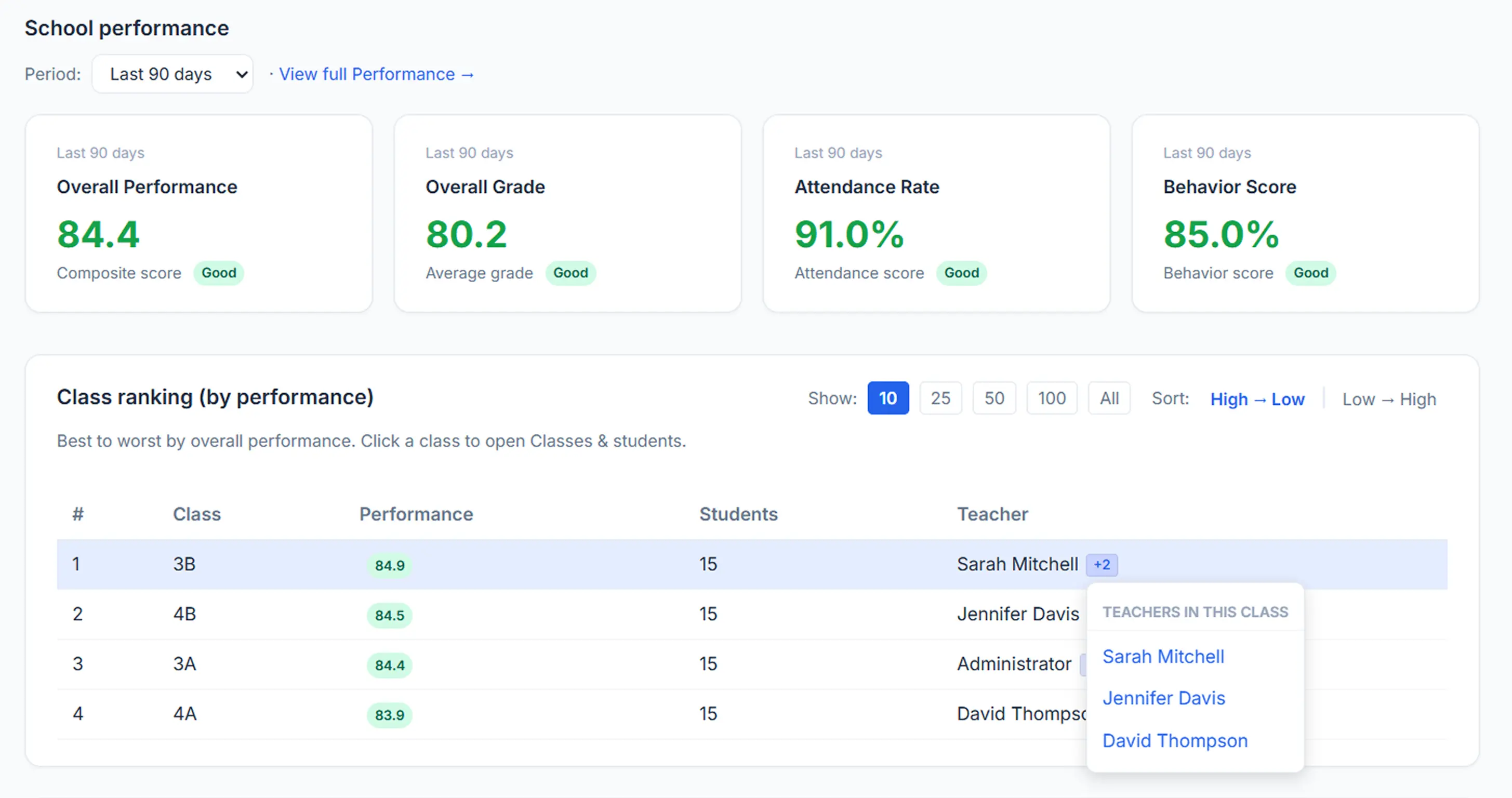
See school-wide trends across grades, attendance, behavior, classes, and students from the same data teachers already record.
One shared source of truth for teachers, administrators, and families.
Explore Lekktura for Your School
Find the right solution for your school type or explore the school management features you need.
School management software your staff can adopt quickly
Set up your K–12 school management system without a long implementation. Add teachers, create classes, set staff permissions, and start managing grades, attendance, student records, and parent reporting in days — not months.
Create classes, import students, invite teachers, and start using your school dashboard without a dedicated IT team.
Role-based staff access
Teachers access only their assigned classes, while principals and administrators get school-wide visibility.
Parent progress reports
Send private student progress reports with grades, attendance, and behavior — without requiring parent accounts or another app.
Simple teacher adoption
Give teachers one place for everyday grades, attendance, behavior tracking, and student progress instead of separate spreadsheets and tools.
Built around real school needs
What schools need from management software
Schools need software that teachers can use every day, administrators can control clearly, and parents can access without extra friction.
KEY REQUIREMENT 1
Easy for teachers
Manage grades, attendance, behavior, and student progress in one clear daily workflow.
Result: faster adoption and more consistent records
KEY REQUIREMENT 2
Clear staff access
Teachers see their assigned classes, while principals and administrators get the school-wide visibility they need.
Result: clear responsibilities and fewer access mistakes
KEY REQUIREMENT 3
Simple parent communication
Send private progress reports by secure link without requiring parents to create another account or install an app.
Result: easier updates and less back-and-forth
Built for efficient school operations
Less setup. Less manual work. Clearer reporting.
Lekktura is designed to help schools get started quickly and reduce the repetitive work created by spreadsheets, separate tools, and manual parent updates.
Fast setup
Start in minutes
Create your school workspace, add a class, and begin without a complex implementation or dedicated IT team.
Parent reporting
Ready to send
Generate private progress reports from current student data and share them with parents by secure link.
Less manual admin
One shared workflow
Keep grades, attendance, student records, and reporting connected instead of maintaining duplicate spreadsheets and separate tools.
School-wide visibility
See the whole school
Give principals and administrators one place to review grades, attendance, behavior, and student progress across classes.
Actual setup time and time savings vary by school, data, and workflow.
For teachers
Teacher dashboard built for speed — updates in minutes, not hours.
A teacher-first daily workflow for grades and attendance, with optional behavior notes and
parent-ready reporting when you need it. Less clicking, less copy/paste, more time for teaching.
Fast daily workflow
Quick grade entry
Attendance in seconds
Teacher-only access
Outcome
Less end-of-day admin work, fewer spreadsheets, and more consistent updates without extra effort.
Quick attendance & participation
Mark attendance in seconds per class. Update late/absent statuses without hunting through menus.
Fast gradebook entry
Enter grades quickly by assignment, by student, or by class. Designed for classroom time — fewer clicks, less scrolling.
Simple behavior notes (optional)
Add quick notes when they matter. Notes stay organized on the student record and follow role-based visibility rules.
Parent-ready progress snapshots
When it's time to update families, Lekktura turns the latest class data into a parent-ready report —
no manual copy/paste.
Teacher dashboard for schools: quick gradebook workflow, attendance tracking, and optional behavior notes — organized by class and school year.
For parents
Parent progress reports — no login, no app, just a private link.
Keep families informed with simple parent communication.
Lekktura sends student progress updates that include grades, attendance, and behavior —
delivered as a secure link in the parent's inbox.
No parent accounts
Works on any device
Private, unique links
Automatic send protection
Send a progress report to one parent, one class, or the entire school.
Lekktura formats, delivers, and tracks report delivery automatically.
Private, no-login access
Each parent receives a unique, private link. They open it in any browser — no portal passwords, no app downloads. The report shows a snapshot of the last 30 days of grades, attendance, and behavior (sending frequency is configurable — e.g. every 30 days or on your schedule).
Smart sending limits
Built-in safeguards prevent duplicate sends.
The same parent won't receive the same report twice within 24 hours.
Outcome: Less inbox noise, fewer "did you send this?" messages,
and more consistent family communication.
Parent reporting designed for schools: progress updates, grade summaries, attendance history, and behavior notes — delivered securely by email link.
For principals
School analytics dashboard that shows what's working — and what needs attention.
Get a clear school-wide view of grades, attendance, and behavior trends.
Filter by class, subject, and time period to turn reporting into action — not just numbers.
School-wide analytics
Trends over time
Early warning signals
Admin visibility
Built for school leadership: quickly identify gaps, prioritize support, and follow improvement over time.
What you can do
Practical school dashboards for grades, attendance, and behavior — designed for decisions and follow-through.
1
Filter by time period, class, or subject
Zoom in to a grade level, a single class, or a subject area — and compare trends across weeks and months.
2
Track grade, attendance, and behavior trends
Monitor average grades, attendance rates, and behavior patterns over time to spot changes early.
3
Teacher outcomes overview (aggregate, not a personal score)
View a per-teacher summary of outcomes (grades, attendance, behavior) as a school dashboard metric — designed for support and resource planning, not individual evaluation.
4
Identify struggling students earlier
Spot students trending down in attendance, grades, or behavior — so small problems don't become big ones.
Outcome: Faster interventions, clearer priorities, and measurable improvement tracking across the school.
Principal dashboard for school-wide analytics: grade trends, attendance trends, behavior trends, and early warning signals — organized by class, subject, and time period.
Security & Privacy
Student data security built for schools.
Lekktura protects student information with encryption, strict access controls, and automated backups —
so your school can track grades, attendance, and reports without compromising privacy.
Encryption in transit & at rest
Role-based access (RBAC)
Time-limited parent links
Automated backups
Secure storage + encryption
Student data is stored securely in the cloud with encryption in transit and at rest.
Backups run automatically and retention follows your plan settings.
• Encrypted connections (in transit)
• Encrypted storage (at rest)
• Automated backups
• Configurable retention by plan
Role-based access control (RBAC)
Access is strictly role-based. Principals and admins control who can view and manage data.
Teachers see only their assigned classes.
Outcome: Clear permissions, fewer mistakes, and safer student data handling.
No parent passwords (secure links)
Parents don’t need accounts. They open a unique, time-limited link to view their child’s progress —
no login, no app, and fewer password-related risks.
If FERPA or COPPA applies to your school, ask us about our security practices —
we’re happy to explain how we support your compliance requirements.
Student data security for schools: encryption, role-based access control, secure parent links, and automated backups.
Compliance
Built to support FERPA and COPPA requirements.
Lekktura is designed for secure student data handling and controlled access — the building blocks schools need
when evaluating FERPA- and COPPA-aligned software.
Role-based access control
Staff visibility is limited by role (admins vs teachers). This helps reduce unauthorized access to student records.
Encryption + secure storage
Data is encrypted in transit and at rest, with automated backups based on your plan.
Note: Compliance depends on how a school configures and uses software.
If your school requires specific documentation (DPA, security summary, data retention terms), contact us and we'll provide our current practices and roadmap.
About Lekktura
A school operations dashboard teachers actually use.
Lekktura is built to simplify day-to-day school workflows — with a fast teacher dashboard,
school-wide reporting for leadership, and parent communication that doesn't require accounts or apps.
Less admin work, clearer visibility, better follow-through.
Why schools choose it
What makes it different
Teacher-first UX
Clear permissions
Teacher-first workflow
Designed for speed during the school day — fewer clicks, less busywork, more consistency.
School-wide reporting
Leadership can monitor trends by class, subject, and time period to prioritize support.
Clear permissions
Staff only see what they should — fewer mistakes, clearer accountability. Details in Security below.
Parent communication
Progress updates delivered by secure link — simple for families, controlled for schools.
Our focus
Reduce friction, increase adoption, and keep information organized —
so schools spend less time managing tools and more time supporting students.
Less busywork
Higher adoption
Cleaner workflows
Who's behind Lekktura
A US-based team focused on K–12 school operations: teacher workflow, leadership visibility, and parent communication. Our goal is a system schools actually adopt — fast to set up and easy to run every day. Want to evaluate Lekktura for your school? We'll help you map your workflow.
Trust & contact
Location: US-based
Support: Email support during pilot and paid plans
Security: Encrypted data in transit & at rest, access by role (see Security section)
See how Lekktura helps K–12 schools bring grades, attendance, behavior, reporting, and parent communication into one school management platform.
Grades, attendance, and behavior are stored in different places
When school data lives across spreadsheets and separate tools, principals spend more time collecting information and less time using it.
Problem
Teachers track grades and attendance in separate spreadsheets, while behavior and student notes may live somewhere else. School-wide reporting requires manual consolidation.
With Lekktura
Grades, attendance, behavior, student records, and classes stay connected in one system. Principals get a school-wide admin dashboard, while teachers access only their assigned classes.
Result
•
One current view of student progress across the school.
•
Less time spent collecting and combining teacher spreadsheets.
•
More consistent records across classes and school years.
Parent updates require too much manual work
When student information is spread across different tools, even a simple progress update can turn into another administrative task for teachers.
Problem
Teachers repeatedly copy grades, attendance, and progress information into individual emails or messages whenever parents ask for an update.
With Lekktura
Generate parent progress reports from current student data and share them through a private secure link. Parents can view the report in any browser without creating an account or installing an app.
Result
•
More consistent parent communication.
•
Less manual copying and repeated update emails.
•
Parents get one clear view of current student progress.
These examples describe common school workflows discussed during demos and onboarding. They are not individual customer case studies, and results vary by school.
Alternatives
How Lekktura compares to spreadsheets and disconnected tools
Many schools start with spreadsheets, emails, and multiple apps. Lekktura replaces that patchwork with one workflow and one school-wide view.
Spreadsheets + email
Spreadsheets & email
Manual updates, version confusion, and constant follow-ups.
With Lekktura
Structured reports, consistent formatting, and one-click sending.
Multiple apps
Multiple tools
Data lives in silos: grades here, attendance there, behavior somewhere else.
With Lekktura
Grades, attendance, and behavior in one place — one report for families.
Heavy SIS rollout
Full SIS implementation
Powerful, but often slow to deploy and hard to get staff adoption.
With Lekktura
Lightweight setup in days with role-based access and clear routines.
Questions before you start
Frequently asked questions
Quick answers about pricing, access, parent reports, and school-wide dashboards.
How much does Lekktura cost for schools?
Pricing is per school (not per teacher). Start with a 30-day free pilot, then choose a plan:
Micro — $49/mo ($38/mo billed annually)
Pilot — $99/mo ($83/mo billed annually)
Plus — $229/mo ($191/mo billed annually)
Premium — $379/mo ($316/mo billed annually)
Annual billing saves up to $756/year.
How do I invite teachers?
Go to Teachers, enter an email address, and send an invite.
The teacher receives a secure link that's valid for 30 days. Each link is single-use and expires automatically.
Do teachers see every student in the school?
No. Teachers only see the classes and subjects they are assigned to.
Principals and administrators have broader school-wide access based on their role.
Do parents need to create an account?
No. Parents receive a unique private link by email. They open it in any browser to view their child's progress report —
no signup and no passwords.
Can a teacher use Lekktura for private students too?
Yes. Teachers can use one account for both school and personal use.
Switch between the school dashboard and a personal dashboard from the navigation menu.
What does the teacher outcomes score measure?
It summarizes aggregate student outcomes (for example: grade trends, attendance patterns, and behavior activity)
over a selected time period. Principals can filter by 7, 14, 30, 90, or 180 days.
It's a school analytics metric for visibility and support — not a personal evaluation score.
Is Lekktura an all-in-one gradebook and attendance system?
Yes. Lekktura combines gradebook and attendance tracking with optional behavior notes in one workflow,
so staff don't have to switch between spreadsheets and multiple tools.
Is there a principal admin dashboard for school-wide reporting?
Yes. Principals and admins can view school-wide trends, manage teachers and classes, and oversee reporting.
With role-based access, admins have full visibility while teachers see only their assigned classes.
Is Lekktura a PowerSchool alternative?
We're not a full student information system (SIS). Lekktura is a lightweight operations and reporting workflow — gradebook, attendance, behavior, and parent progress reports — that schools can adopt without replacing their SIS. If you need a simpler alternative to spreadsheets and disconnected tools, we're built for that.
Is Lekktura a full Student Information System (SIS)?
No. Lekktura focuses on daily school operations such as gradebook, attendance, student records, behavior tracking, parent progress reports, staff access, and school-wide analytics.
Can we use Lekktura alongside our existing SIS?
Yes. Schools can keep an existing SIS for their official administrative workflows and use Lekktura for everyday teacher, reporting, and parent communication workflows.
The important part is deciding which system is the source of truth for each type of data.
Can we import our existing students from Excel or Google Sheets?
Yes. You can prepare your student roster as a CSV file and import students instead of entering every record manually.
This is especially useful for schools currently managing student lists in spreadsheets.
How long does it take to set up a school?
You can create a workspace and first class in minutes.
A full rollout depends on how many students, classes, teachers, and existing records you need to organize or import.
There is no complex server installation or dedicated IT setup required.
Do we need an IT department to use Lekktura?
No dedicated IT team is required for normal setup.
Schools can create the workspace, add or import students, create classes, invite teachers, and begin using the platform through the web interface.
How does Lekktura protect student data?
Lekktura uses encrypted connections and storage, automated backups, and role-based access controls.
Teachers are limited to the classes they are authorized to access, while school administrators receive broader permissions.
Can we try Lekktura before moving the whole school?
Yes. Schools can start with a 30-day free pilot and test the workflow before committing to a broader rollout.
A practical pilot is to begin with a real class, a small group of teachers, and current student data.
Have a specific question about your school setup? Contact us and we’ll help you map the workflow.
Your school deserves better tools.
Join schools already using Lekktura to save time, stay organized, and keep every parent in the loop.