
Parent Communication Software for Schools
Most parent portals fail for a boring reason: parents will not create and remember another account. Lekktura sends each family a private link that opens their child’s progress report directly — no app, no password, nothing for the school office to reset.
- No parent logins or apps
- One link, one child
- Send to a class or the whole school
No credit card required · Set up in days, not months
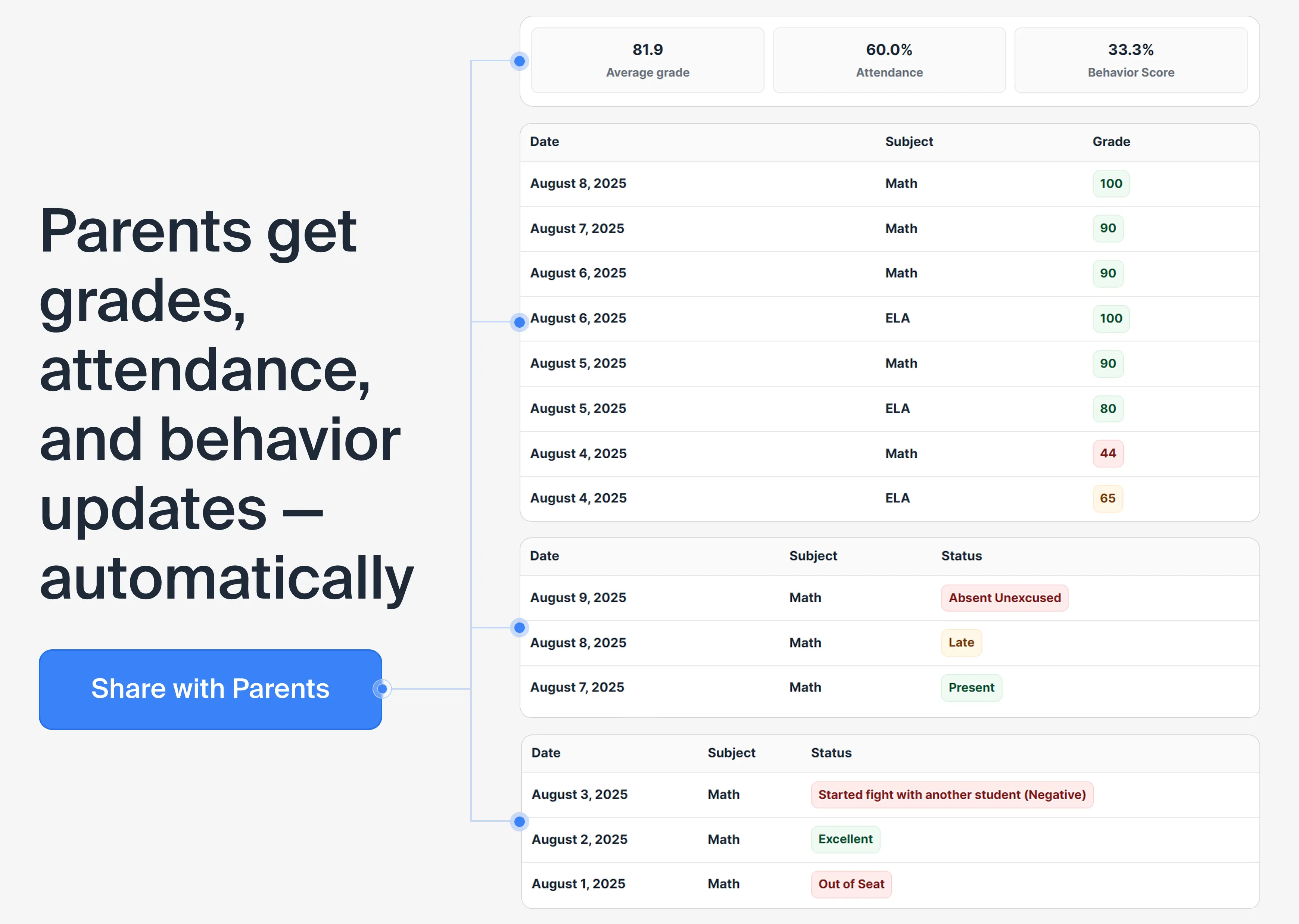
The parent portal adoption problem
Schools routinely buy parent portals that reach a fraction of families. The feature set is rarely the reason. The reason is that using it requires a parent to install something, create an account, verify an email, and remember a password until the next report — four separate chances to drop out.
Removing the account removes the drop-off. A link that simply opens is used by far more families than a portal that has to be joined, and it removes the password resets that otherwise land on the school office.
How it works
A teacher or administrator adds the parent email for a student. The platform generates a private link for that specific child. The parent opens it and sees a read-only report of grades, attendance, and behavior for the recent period, presented plainly.
One link per student, tied to the parent email on file
Send for a single student, a whole class, or the entire school
Read-only — families cannot alter the record
Access can be withdrawn, which stops previously issued links working
Sending is a decision, not a background job
Reports go out when the school chooses to send them: for one student, for a class, or for everyone in one action. There is no silent automated dispatch running in the background.
That is intentional. Schools generally want to know that a report went out before a parent evening or at the end of a unit — not to discover that something was mailed to every family on a day when the data was half-entered.
Privacy by construction
Because each link resolves to a single student, there is no directory to browse and no way for one family to reach another family’s data. When a parent’s access is removed, invitations that were issued but never used are revoked at the same time, so old links stop working.
This matters in situations schools deal with more often than software vendors assume: custody changes, safeguarding concerns, and families where access needs to end quickly and completely.
What this changes for staff
The measurable win is fewer status requests. When families have been seeing the same data all term, parent conversations start from a shared picture instead of beginning with a member of staff reconstructing it from memory.
The second win is quieter: no parent account administration. Nobody at the school spends time creating logins, resetting passwords, or explaining an app to a family that does not want one.
Which schools this fits
Parent portal software succeeds or fails on the percentage of families who open it. That number depends far more on your community than on features, which is why removing the login matters most where it matters most.
School-home communication that needs no app reaches families that an app never will.
Schools where many families share one device or have limited data
Private schools and independent schools sending regular progress reports
Charter schools with high parent-engagement expectations
Elementary schools where parents want frequent, short updates
Small districts without staff to administer parent accounts
Schools that previously bought a parent portal nobody used
What to check when comparing parent portals
Parent-facing tools are judged on the percentage of families who actually use them, not on features. Worth asking:
-
1
Whether a parent needs an account, an app, or a password
-
2
How much office time goes into parent account administration
-
3
Whether one link can only ever reach one child
-
4
How quickly access can be withdrawn, and whether old links die with it
-
5
Whether a report can be sent to a whole class or school in one action
-
6
Whether families see the same data staff see, or a delayed copy
Questions before you start
Short answers to what schools ask most.
Do parents need an account or an app?
No. Parents receive a private link that opens their child’s progress report directly in a browser. There is nothing to install, no password to remember, and no account for school staff to create or reset — which is why more families actually use it.
Can a parent see other students?
No. Each link is tied to one student and resolves only to that student’s record. There is no directory to browse and no way to reach another family’s data. Parent visibility is limited to grades, attendance, and behavior for their own child.
Are reports sent automatically?
No. Sending is a deliberate action by the school: for one student, for a class, or for everyone at once. Schools generally prefer to send before a parent evening or at the end of a unit, rather than have reports dispatched while data is still being entered.
What does a parent actually see?
A read-only summary of their child’s grades, attendance, and behavior for the recent period. It is presented plainly rather than as a dashboard, because the audience is a parent checking on one child, not a member of staff analysing a cohort.
What if a family should no longer have access?
Access is removed from the student record, and any invitation links that were issued but not yet used are revoked at the same time so they stop working. This matters in custody and safeguarding situations where stale access is a real risk.
Can parents reply or change anything?
No. The report is read-only. Parents cannot edit grades, attendance, or behavior, and the link is not a messaging channel — it is a window onto the record the school holds, which keeps the source of truth in one place.
Does this work for families without smartphones?
Yes. The report opens in any browser on any device, including an older phone or a shared computer. Because there is no app and no account, the barrier for families with limited technology is as low as it can reasonably be.
Is this a parent portal?
It does the job of a parent portal without the portal. Families get a private link to their child's progress instead of an account to create and maintain, which is what usually decides whether parent communication software is actually used.
Can we send progress reports to every family at once?
Yes. Reports can be sent for a single student, for one class, or for every student with a parent email in the school, in one action. Sending stays a decision the school makes rather than something running in the background.
More for schools
Other parts of the platform your school will use every day.
Run Your School's Daily Academic Workflow in One Place
Create your school, invite teachers by email, and start recording real grades and attendance during the pilot. No installation, no IT project.
30-day free pilot · No credit card required