
School Gradebook Software for K-12 Schools
A school gradebook is only useful when every teacher actually uses the same one. Lekktura gives each teacher a fast, focused gradebook for the classes they teach, while the principal sees every class in the school from a single screen — without collecting spreadsheets at the end of each term.
- One gradebook school-wide
- Teachers see only their classes
- Grades, attendance and behavior together
No credit card required · Set up in days, not months
Why school-wide gradebooks fail
Most schools do not lack a gradebook. They have too many. One teacher keeps a spreadsheet, another uses the district system, a third tracks scores on paper and transfers them at the end of term. Nothing is wrong with any single method, but together they make a school-level view impossible.
The failure point is almost never the feature list. It is adoption. If recording a set of grades takes longer than the spreadsheet the teacher already trusts, the rollout quietly stops after week two — and the principal is back to collecting files by email.
That is the constraint this gradebook is built around. Everything a teacher does most often is on one screen, and nothing about it assumes a free evening.
What teachers get
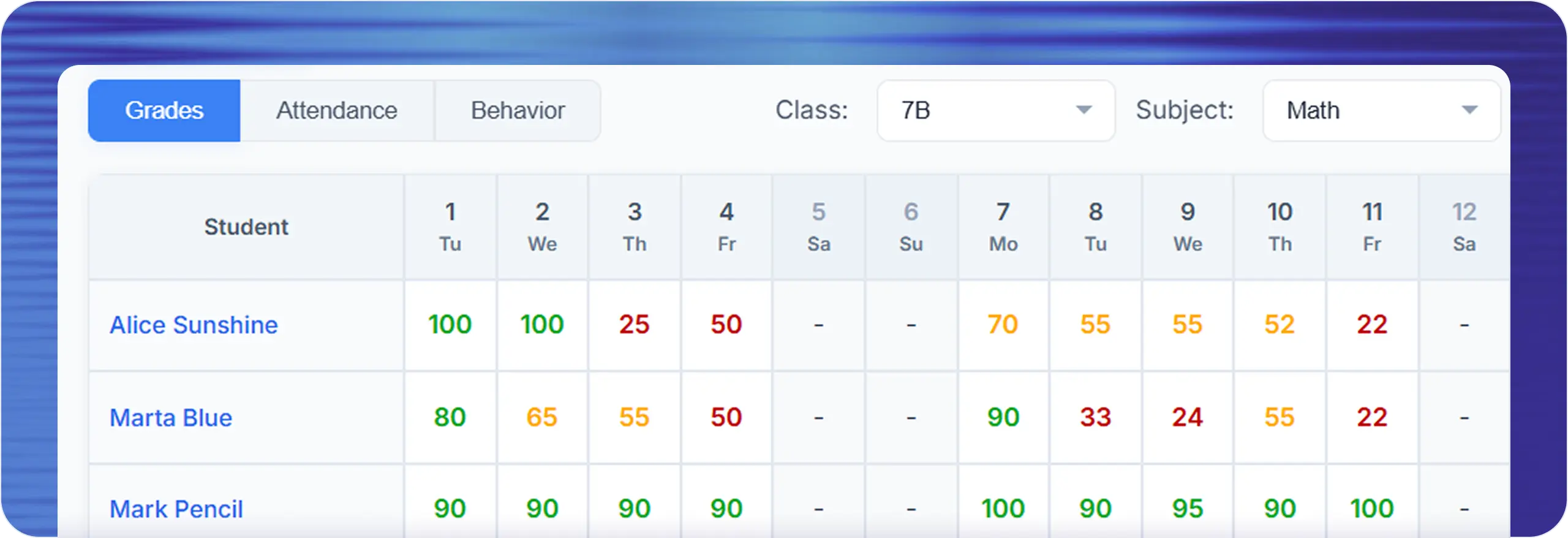
Each teacher opens a class, sees their students, and enters scores. Because access is tied to the subjects they teach, there is no scrolling past other people's classes and no risk of editing the wrong record.
Grades recorded per student, per subject, per date
Weighted components inside a single cell when one mark has several parts
A comment on any individual grade, kept with the record
The same screen also holds attendance and behavior for that lesson
Bulk entry for a whole class when marking a shared assessment
Data entry designed for minutes between lessons, not a free evening
What principals get
The school view is the point. Instead of requesting reports, the principal opens the school journal and sees current data across every class and subject — who is recording, what the spread of results looks like, and where a class has stopped being updated.
That last signal is the one schools underestimate. A class with no entries for three weeks is not a data problem; it is a teacher who needs help, a timetable change nobody recorded, or a rollout that never reached one department.
Every class in the school in one place, always current
Drill from the school view into a class, a subject, or a single student
Aggregated view designed for support and improvement, not staff evaluation
Grades that keep their context
A number on its own is hard to act on months later. Each grade stays attached to the student, the subject and the date it was given, and can carry a comment explaining what it was for. When a parent asks about a mark in March, the answer does not depend on whether a teacher remembers.
Where a single mark is made up of several parts, those parts can be recorded inside one cell with their own weights rather than flattened into an average that nobody can reconstruct.
Consistency across the school
Because grades are stored per student, per subject and per date rather than in a file that one person owns, any student’s record can be reviewed at any time without hunting for the right version of the right spreadsheet.
Access follows role throughout: principals and school administrators see the whole school, teachers see the classes they are assigned to, and parents see only their own child. Nobody has to remember who should not be looking at what.
Which schools this fits
An online gradebook is not one product. A 60-student microschool and a three-form-entry primary have different problems, and the electronic gradebook that suits one is usually wrong for the other.
This one is built for schools that want a shared K-12 gradebook system running quickly, without a district-scale implementation project.
Private schools and independent schools moving off spreadsheets
Charter schools that need one digital gradebook across every teacher
Small districts without dedicated IT staff
Microschools and new schools setting up their first grade tracking system
Tutoring centres and academies running structured classes
Schools keeping a district SIS but needing a usable daily gradebook
What to check when comparing gradebooks
Most gradebook tools demo well. The differences that decide whether a rollout survives the first term are usually these:
-
1
How many clicks to record a full class — this predicts adoption more than anything else
-
2
Whether attendance and behavior sit on the same screen or in separate tools
-
3
Whether teachers can see classes that are not theirs
-
4
Whether the principal gets a live view or has to request exports
-
5
How long setup takes before real data is going in
-
6
What happens to records when a teacher leaves mid-year
Questions before you start
Short answers to what schools ask most.
What is school gradebook software?
School gradebook software is a shared system where every teacher in a school records student grades, replacing individual spreadsheets. It gives administrators a current, school-wide view of academic progress and keeps student records consistent across classes and subjects.
How is this different from a district SIS?
A full student information system handles enrolment, scheduling, billing, and state reporting, and usually needs IT staff and a long implementation. Lekktura covers the daily teaching record — grades, attendance, behavior, and parent reporting — and is designed to be running within days.
Can teachers see other teachers’ classes?
No. Teachers see only the classes and subjects they are assigned to. Principals and school administrators see the full school. This separation is enforced by the platform rather than by convention, which reduces both mistakes and unnecessary access to student data.
Can one mark be made up of several parts?
Yes. A single cell can hold several weighted components, so a mark combining a test, homework, and participation stays visible as its parts rather than as one flattened number. This matters when a parent or a teacher needs to understand how a grade was reached.
How long does it take to set up?
Most schools are entering real data within days. A principal creates the school, adds classes, invites teachers by email, and imports students from a spreadsheet. There is no server to install and no IT project — the 30-day pilot is designed to be a real rollout, not a demo.
Do we have to stop using our current SIS?
No. Schools commonly keep an existing student information system for enrolment and official reporting, and use Lekktura for the daily teaching record and parent communication. It is designed to sit alongside a heavier system rather than force a full migration.
What happens if a teacher leaves during the year?
Their access is removed, and the subjects they taught can be reassigned to another teacher. The grades, attendance, and behavior they recorded stay with the school, so the class history does not leave with the staff member.
Is there a free gradebook for schools?
The 30-day pilot is free and is a full school account, not a limited demo — real classes, real teachers, real data. After that a school plan is paid per school rather than per teacher, so cost does not rise every time you hire.
Does it work for private and charter schools?
Yes. Private, independent, and charter schools are the most common fit, along with microschools and small districts. These are schools that need a shared gradebook running quickly and do not have an IT department to run a district-scale rollout.
More for schools
Other parts of the platform your school will use every day.
Run Your School's Daily Academic Workflow in One Place
Create your school, invite teachers by email, and start recording real grades and attendance during the pilot. No installation, no IT project.
30-day free pilot · No credit card required