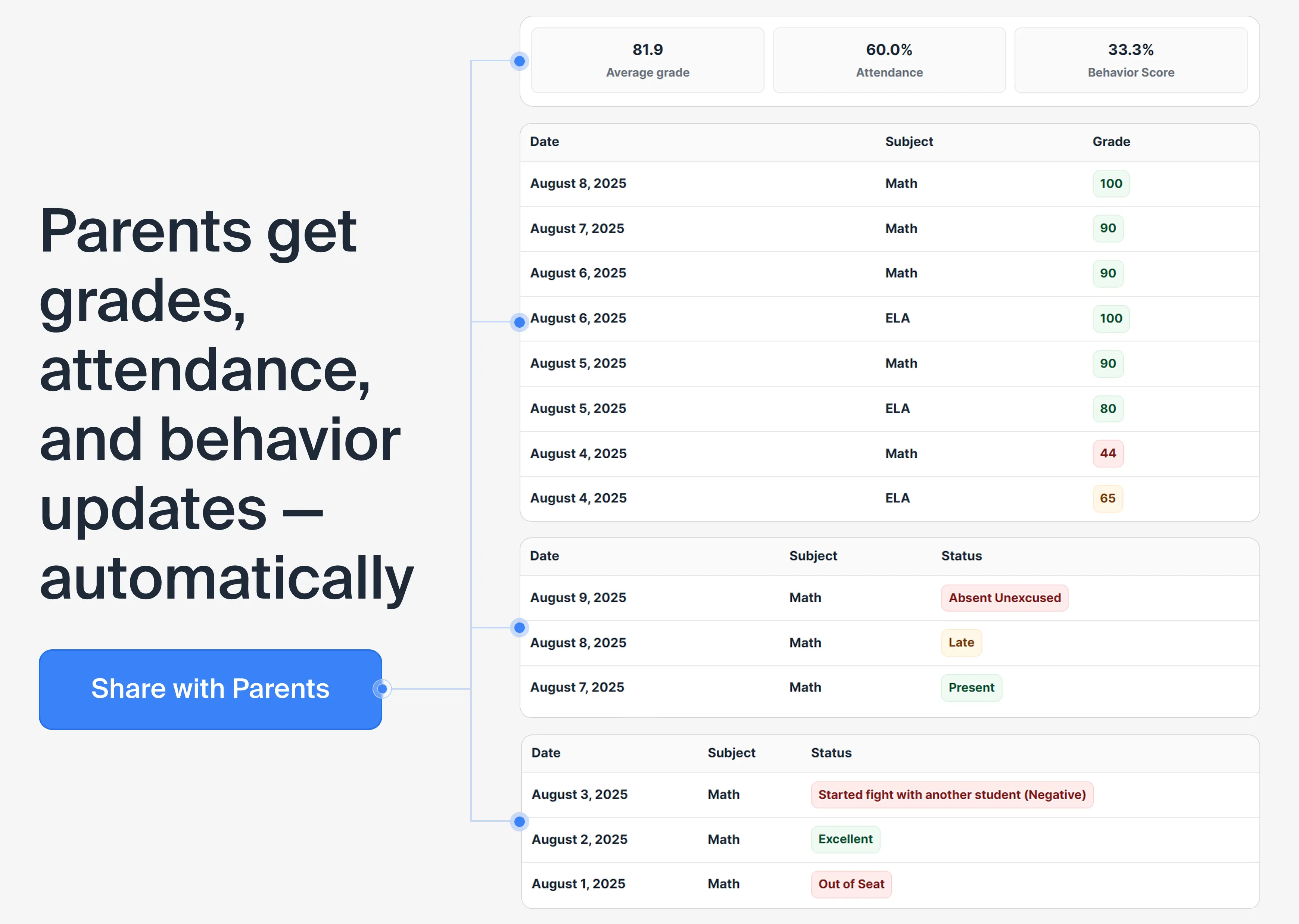
Grades
Every assignment score and subject average — directly from your gradebook. Updated the moment you enter a grade.
- — Date, subject, score for each entry
- — Overall average per subject
- — Filterable by time period
Give parents and guardians secure, read-only access to their child’s grades, attendance, and behavior — before small issues become big problems.
Free plan includes 3 parents · No app for families to install
The old way
Parents don't have visibility, so they email. You already know — but now you have to write back, find the grade, format it, send it.
Concerns that could've been addressed in a 10-second portal check turn into 30-minute meetings.
Download, format, attach, send — for every student, every month. Rinse and repeat.
The new way
You enter data as usual. Parents open the portal and see them. That's the whole system.
| Student | Quiz 1 | Quiz 2 | Homework |
|---|---|---|---|
| Jake Brown | 88 | 91 | 85 |
| Emma Anderson | 92 | 87 |
|
| Tom Davis | 83 | 78 | — |
“You teach. The portal communicates.”
What parents see
Parents get read-only access. They can look. They can filter. They cannot change a single thing.
Every assignment score and subject average — directly from your gradebook. Updated the moment you enter a grade.
Full attendance record for every class — date, subject, and status. No ambiguity, no “I didn’t know.”
Behavior log entries with dates and context. Parents see what happened in class — without you having to call.
Families can view information only for their child. Teacher data and other students’ data stays private and secure.
Save time, simplify communication, and keep parents informed - effortlessly.
Parents can check grades, attendance, and behavior anytime — without emailing or calling you. No more chasing progress updates; it’s all in one place.
Give families a way to find answers themselves — grades, attendance, and behavior stay up to date. Routine “how’s my child doing?” questions drop, freeing more time for lesson planning and teaching.
Information is updated automatically from your Lekktura Dashboard. You don’t need to prepare reports — parents see the same data you do, in real time.
Grant access with a single parent email per student. Update or revoke it instantly from your dashboard — you’re always in control.
Less back-and-forth, more time for teaching — and parents stay informed.
fewer parent emails and calls
fewer last-minute progress meetings
of parents check updates monthly
improvement in academic performance
more personal time for teachers
Based on internal teacher feedback and early usage data (2025). Results may vary.
| Feature | Lekktura (Starter+) | ClassDojo | Google Classroom | PowerSchool |
|---|---|---|---|---|
| No app required for parents | Yes | Yes (web available, app optional) | Yes (web primary, app optional) | Yes (web portal, app optional) |
| Real-time grades & behavior | Yes | Limited (behavior yes, grades via portfolios only) | Limited | Yes |
| Teacher-controlled access (invite only) | Yes | Yes | Varies | Yes |
| Read-only for parents (can't edit grades) | Yes | Yes | Yes | Yes |
| Attendance visible to parents | Yes | Limited (basic tracking, full alerts) | Limited | Yes |
| Behavior notes visible to parents | Yes | Yes | No | Yes |
| Parent portal on lower-cost / free tier | Yes (Starter) | Limited | Yes | No |
| Multiple children per parent account | Yes | Yes | Yes | Yes |
| Secure link, no app install | Yes | Yes (web link, but app promoted) | Varies | Varies |

Data from official sites (classdojo.com, edu.google.com, powerschool.com), teacher reviews (Reddit, YouTube), and comparisons (GetApp, SoftwareAdvice), February 2026. Features may vary by region/school setup.
What teachers say
"Before Lekktura, I'd get 5–10 parent emails every Monday asking about grades. Now I get maybe one or two a month — and those are actually meaningful conversations, not just status checks."
"I'm a private tutor with 14 students. The Parent Portal means parents can check in anytime without messaging me. Setup took under 10 minutes and parents love it — no app, just a link."
"Parent meetings used to start with 20 minutes of 'catching up.' Now parents arrive already knowing the grades and attendance — we can spend that time actually problem-solving together."
Quick answers to common questions
Parent Portal is available in Starter and Pro plans. These plans give you all the tools to keep parents informed automatically — saving you hours each month. Compare plans and start today.
No apps, no setup hassles — parents just click a secure link and sign in from any device. That means higher parent engagement from day one.
Yes, you control access at all times. Update or remove a parent's access instantly from your dashboard — no waiting on support.
Yes. If a parent has more than one child in your classes, you can grant them access to each student's record. This makes it easy for families to stay involved.
Yes — parents can view grades as soon as you enter or update them in your Lekktura Dashboard. There's no need to send separate updates or reports; the information they see matches what's in your dashboard. Parents stay up to date, and you save time on follow-up emails or calls.
Parents see grades (per assignment and subject averages), attendance (present, late, or absent by date and class), and any behavior notes you add. Everything is read-only — they cannot edit or change any data.
Yes. Access is invite-only — you control who receives a link. Data is encrypted, and each parent sees only their own child's information. Teachers can revoke access at any time from the dashboard.
Lekktura Parent Portal is built for teachers who want a simple, web-only way to share grades, attendance, and behavior — no app required for parents. It's included on the Starter plan, so you get full parent access without enterprise pricing. See the comparison table above for a feature-by-feature breakdown.
Yes — Lekktura works for any teacher, not just K–12 classroom teachers. Private tutors, language teachers, music instructors, and home-school educators all use it to keep parents updated on their child's progress. You don't need school approval or an IT department; sign up, invite a parent, and you're done.
Discover why U.S. K–12 teachers are switching to Lekktura for grades, attendance, and behavior tracking.
Get Started Free