
Spreadsheet Chaos
Grades in Excel. Attendance in a binder. Behavior in sticky notes. Nothing connects.
Enter scores once. Averages calculate automatically. Progress reports generate in one click. Parents see everything through a secure portal — without a single email from you.
2,300+ teachers on Lekktura 3–6 hrs saved per week 100% web-based Free plan available
Spreadsheets are easy to start—but they fragment data across files, hide formula mistakes, and slow parent updates. A digital gradebook keeps everything in one place with fewer manual steps.
Grades in Excel. Attendance in a binder. Behavior in sticky notes. Nothing connects.
One broken formula skews an entire column of averages — and nobody notices until report cards.
Pulling together a progress summary before conferences means digging through three separate files.
Spreadsheets don’t stop you from entering a grade of 150 or recording attendance for next month.
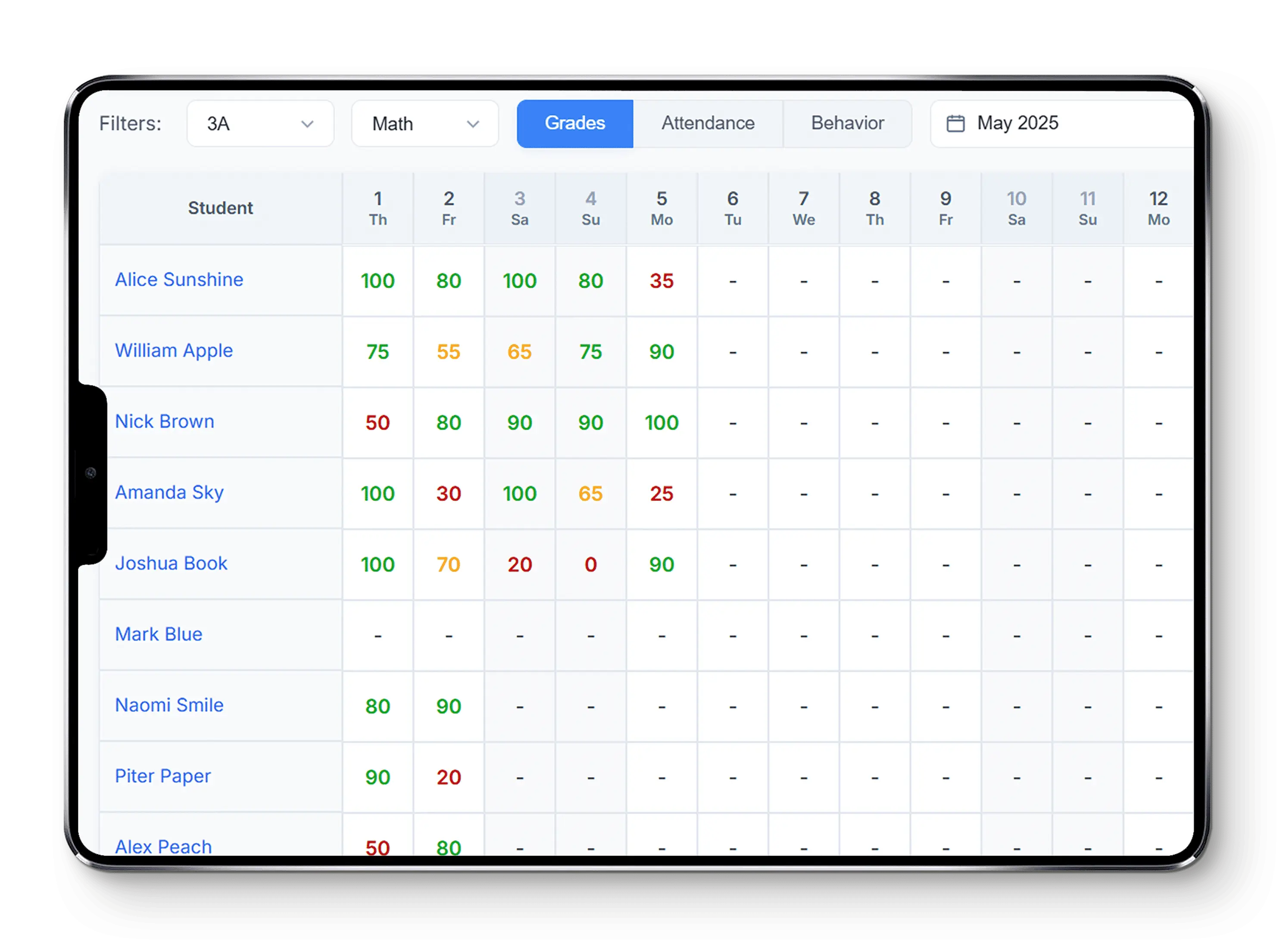
One gradebook software, one grid — switch instantly between Grading, Attendance, and Behavior without leaving the page or juggling extra tools.
Enter grades your way—one score at a time, in bulk, or in a fast daily pass. Everything saves cleanly, and averages update automatically.
Click the cell where a student meets an assignment or date, type the score, and press Enter or click away to save. Add an optional comment if you want context on that grade — useful for parents or your own notes later.
Best for: updating individual grades as you finish grading.
Bulk Edit is Cells mode: work across the grid, enter scores as fast as you go, then save everything with one click when you’re ready — instead of committing cell by cell.
Best for: batch-entering grades for many students or assignments before you save.
Pick one day. For that date, walk the roster and enter grades, attendance, and behavior in one streamlined pass — built for “everything for Tuesday” without hopping between modes.
Best for: a single day’s grades, attendance, and behavior for the whole class.
Define categories — tests, homework, projects, classwork. Assign percentage weights to each. The gradebook calculates final scores automatically for every student.
Every new grade recalculates the weighted average instantly
Hover any assignment-linked cell to see category, weight, and final score
Generate a professional, print-ready progress report for any student.
Includes: average grade, attendance record, behavior score, and detailed performance data.
Preview on screen → download or print → share with parents or administrators.
No copy-paste from spreadsheets. No reformatting in Word.
Download your complete gradebook as CSV — all students, all dates, all scores.
Compatible with Excel, Google Sheets, and any school information system that accepts standard CSV.
Perfect for district reporting or keeping a local backup.
Enter the parent’s email. A secure activation link is sent automatically.
One click. Account created. Instant read-only access to their child’s data.
Average grade · Attendance score · Behavior score · Recent grades by subject · Detailed tables
Deactivate a parent’s email in one click. Access removed immediately.
No more progress-update emails. No more screenshot-sharing. Data you already entered does the communication for you.
Lekktura is built so gradebook data stays trustworthy and school-appropriate: validated scores, privacy expectations for student records, role-based access, auto-save, cloud backups, and encrypted connections—instead of an unguarded spreadsheet.
Validation
0–100
Scores must stay inside the allowed range so averages and reports stay trustworthy.
FERPA
Privacy
Grades and attendance only for authorized roles—aligned with FERPA-style privacy.
Access
RBAC
Teachers, admins, and parents only see what their role allows.
Save
Auto
Changes persist as you work so you are less likely to lose entries.
Backup
Cloud
Your data is stored securely in the cloud with regular backups.
Security
HTTPS
Traffic between your browser and Lekktura is protected with HTTPS.
Six essentials in one gradebook—a single place to run your class, track students, and keep families in the loop, without extra setup.
Grades
Auto
Weighted averages and class totals update as you grade — no spreadsheet formulas to rebuild.
Analytics
Live
See how scores and pacing move over time so you can spot who needs support early.
Reports
1-click
Printable progress reports for families and full-gradebook CSV for your own analysis.
Access
Web
Open your gradebook on desktop, tablet, or phone — no install, just sign in and teach.
Pricing
$0
Core gradebook on the free plan — no credit card required to get started.
Workflow
3-in-1
Grades, attendance, and behavior live in the same roster — switch modes without changing tools.
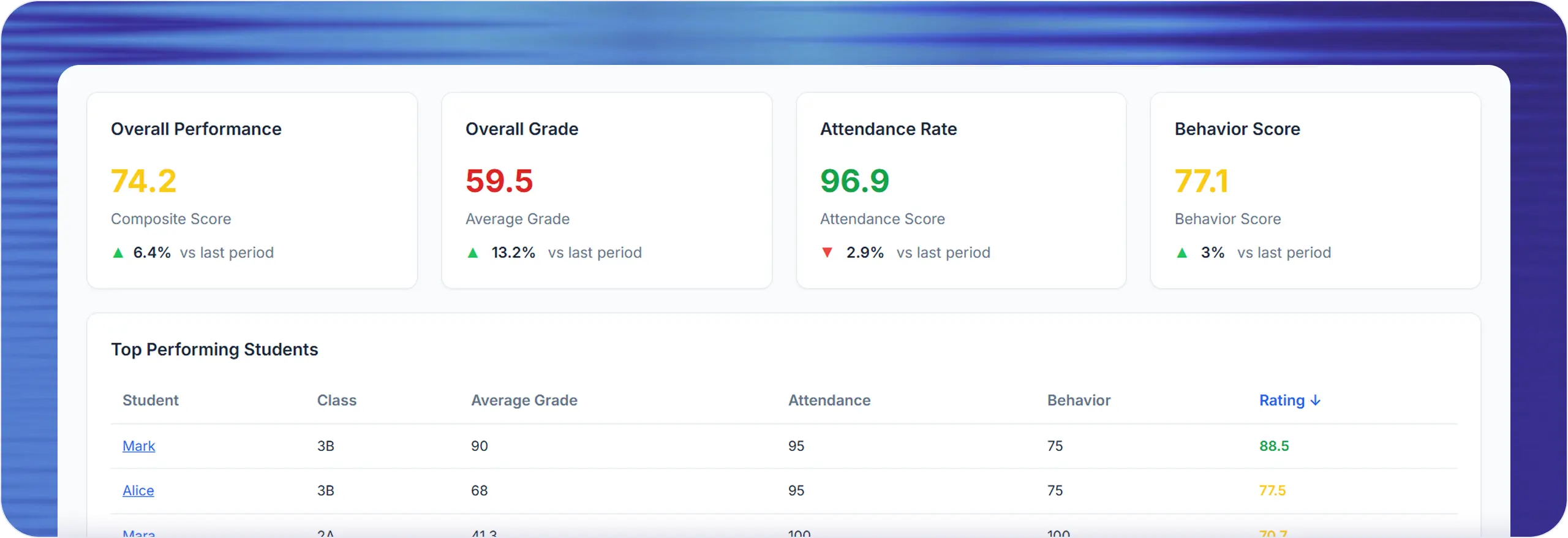
Grades, attendance, and behavior trends in one simple dashboard. Identify students who need help early and keep parents informed with confidence.
Grades
0
See overall class performance and quickly identify students who may need extra help.
Attendance
0%
Monitor attendance trends and respond to absenteeism before it becomes a pattern.
Efficiency
3-6h
Our automated online tool helps you save hours on grading and classroom admin every week.
Behavior
+22%
Monitor positive and negative student actions to support a healthy classroom environment.
Teachers have more than one way to manage grades — but not every option is built for fast, everyday classroom use. Lekktura gives teachers a simpler online gradebook that is easier to manage than spreadsheets, faster than paper gradebooks, and lighter than full school information systems.
Swipe → to read the full table
| Option | Common drawback | Why teachers choose Lekktura |
|---|---|---|
| Spreadsheets | Manual formulas and disconnected files | One connected gradebook for grades, attendance, and behavior |
| Paper gradebooks | Slow updates and manual calculations | Faster entry, automatic averages, and easier reporting |
| Full SIS platforms | Too heavy for many daily classroom tasks | Lighter teacher-first workflow |
| School-wide systems | Often optimized for admin needs first | Easier for individual teachers to adopt and use |
One place for grades, attendance, and behavior — with guardrails spreadsheets and paper can’t match. Scroll horizontally on small screens to see the full comparison.
Swipe → to compare all columns
| Feature | Lekktura | Spreadsheets | Paper |
|---|---|---|---|
| Grades + attendance + behavior unified | One interface | Separate files | Separate books |
| Automatic weighted averages | Built-in | Manual formulas | Calculator |
| Bulk grade entry | Batch save | Cell by cell | One at a time |
| Input validation (0–100) | Enforced | Requires setup | None |
| Future date blocking | Built-in | Not available | N/A |
| PDF progress reports | One click | Manual formatting | Handwritten |
| Parent Portal | Built-in | Not available | In-person only |
| AI-powered assistant | Built-in (Smarty) | Not available | Not available |
| Role-based access control | Per class | File permissions | Physical access |
| Works on mobile | Any browser | Limited | Not possible |
| CSV export | Built-in | Native | Manual re-entry |
| Auto-save | On every action | Depends on settings | N/A — ink is permanent |
| Setup time | Under 2 min | 30+ min | Varies |
Join teachers who’ve already switched to digital gradebook solutions. Start saving time and improving accuracy today.
Real feedback from educators using Lekktura’s digital gradebook.
The automatic calculations save me hours every week. No more staying late to calculate grades manually!
Parent conferences are so much easier with printable reports. Everything is organized and professional.
I love that I can access my gradebook from home or school. The mobile-friendly design is perfect.
Get started in minutes: create your free account, set up classes, and simplify classroom management with Lekktura's digital gradebook tool.
Create your free account in just a few clicks. No paperwork or credit card required — jump straight in and discover all the features from day one.
Easily add your classes, subjects, and students. Keep all your teaching data organized in one secure platform — ready for classroom management.
Begin recording grades, attendance, and student behavior. Instantly access smart analytics and reports to help every student succeed and grow.
Enable the Parent Portal and invite families with one click for secure read-only access to grades and attendance.
Free plan includes 1 class | Up to 20 students | 30 days of data | No credit card
Elementary teachers managing one class across multiple subjects
Middle & high school teachers with multiple sections and weighted categories
Homeschool educators who need professional-grade tracking without enterprise overhead.
New teachers setting up classroom systems for the first time
Experienced teachers replacing fragile spreadsheet workflows
A web-based tool that replaces paper gradebooks and spreadsheets. Teachers enter grades, track attendance, and log behavior in one digital interface that calculates averages automatically and generates reports.
Yes. The free plan includes one class, up to 20 students, and 30 days of data history. No credit card required. Upgrade anytime for more classes, longer retention, parent portal, CSV export, and AI insights.
Yes. Lekktura includes Grading, Attendance, and Behavior modes in one shared student grid, so you can switch context without changing tools.
Define assignment categories - tests, homework, projects, classwork - and assign a percentage weight to each. Every new grade recalculates the weighted average for every student automatically. Hover any assignment-linked cell to see the full category breakdown, weight, and final score.
Single-Cell Edit: click any cell, type the score, save instantly - best for individual updates. Bulk Edit: work across the grid and save everything at once - best for batch entry. Quick Mode: enter grades, attendance, and behavior for one date across the whole class in a single pass - best for end-of-day entry.
Enter the parent's email and a secure 24-hour activation link is sent automatically. The parent clicks the link, creates an account, and gets instant read-only access to grades, attendance, behavior, and detailed performance data. Teachers can revoke access in one click at any time.
Yes. Lekktura offers one-click PDF progress reports for individual students and full-gradebook CSV export for district reporting or analysis in Excel and Google Sheets.
Teachers report saving 3-6 hours per week thanks to faster entry workflows, automatic calculations, one-click reports, and parent self-service visibility.
Yes. Lekktura is fully web-based and works on desktops, laptops, tablets, and phones with no app download required.
Yes. Lekktura includes role-based access, score validation, future-date blocking, encrypted traffic, and secure parent access controls.
Last updated: April 2026
Discover why U.S. K–12 teachers are switching to Lekktura for grades, attendance, and behavior tracking.
Get Started Free
Grade Comments & Color-Coded Performance Tracking
Add short notes where a score needs context. Scores get automatic red, yellow, or green styling from the number—so you can scan the class and spot who needs attention without reading every cell.
Inline comments on any cell
Note that a low score was due to illness. Flag a retake. Record extra credit context. A small indicator shows which cells have notes — hover to read the full comment without cluttering the grid.
Color-coded performance
Green for strong scores, yellow for mid-range, red for low. Scan an entire class in seconds and instantly see who needs attention — without reading every number.
Gradebook preview
Hover cells with a note to read the comment